
JSON, made readable.
AI, kept private.
A native iPhone and iPad app for viewing, editing, and exploring JSON — with an on-device AI assistant that explains your data without sending a byte to the cloud.
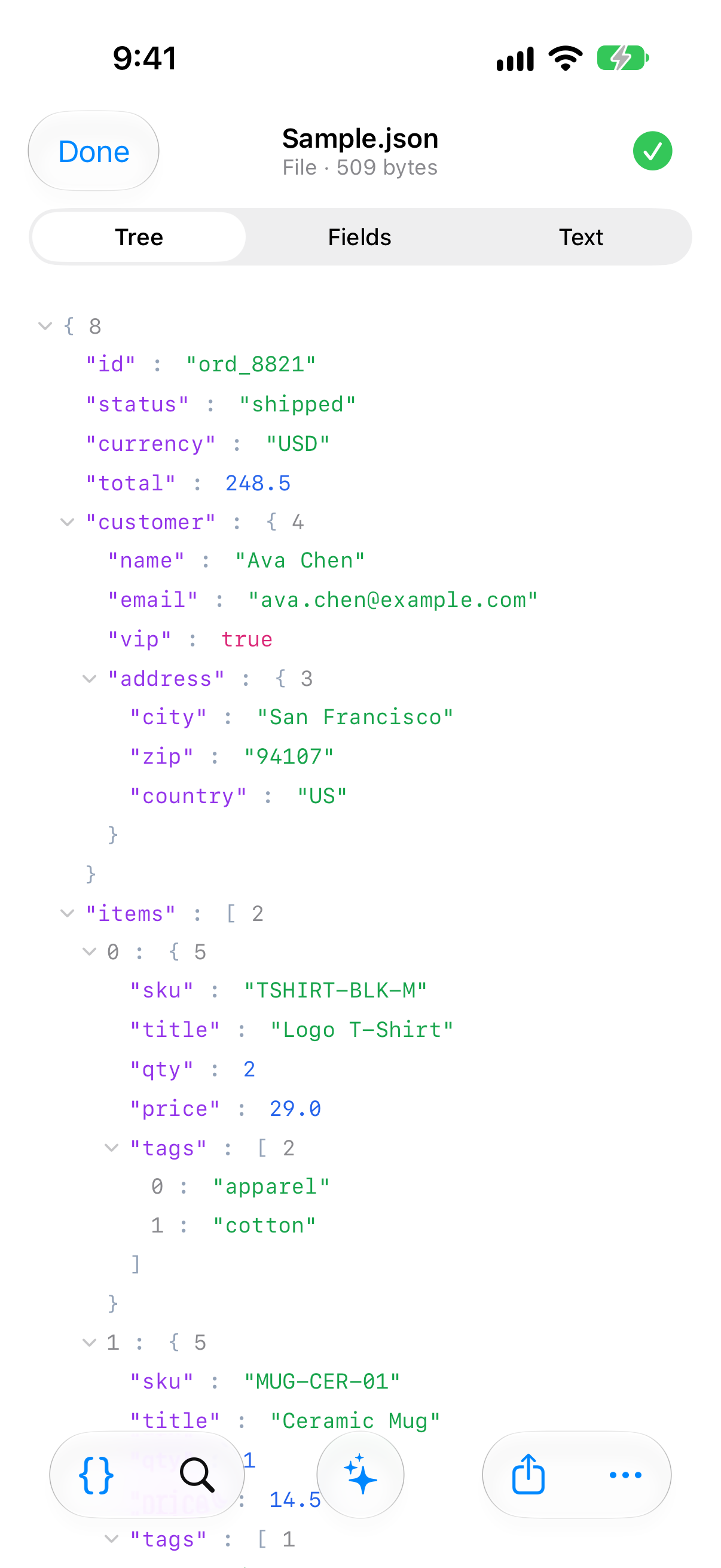
Open any payload, read it three ways, ask an on-device AI what it means — and your documents stay on your device.
Native and fast.
Built for iOS 26 with SwiftUI, Liquid Glass and the system's own controls, on iPhone and iPad. Tree, Fields and Text views, per-file Recents, dark mode and Dynamic Type. Multi-megabyte files open, search and edit without freezing.
An AI assistant that stays on your device.
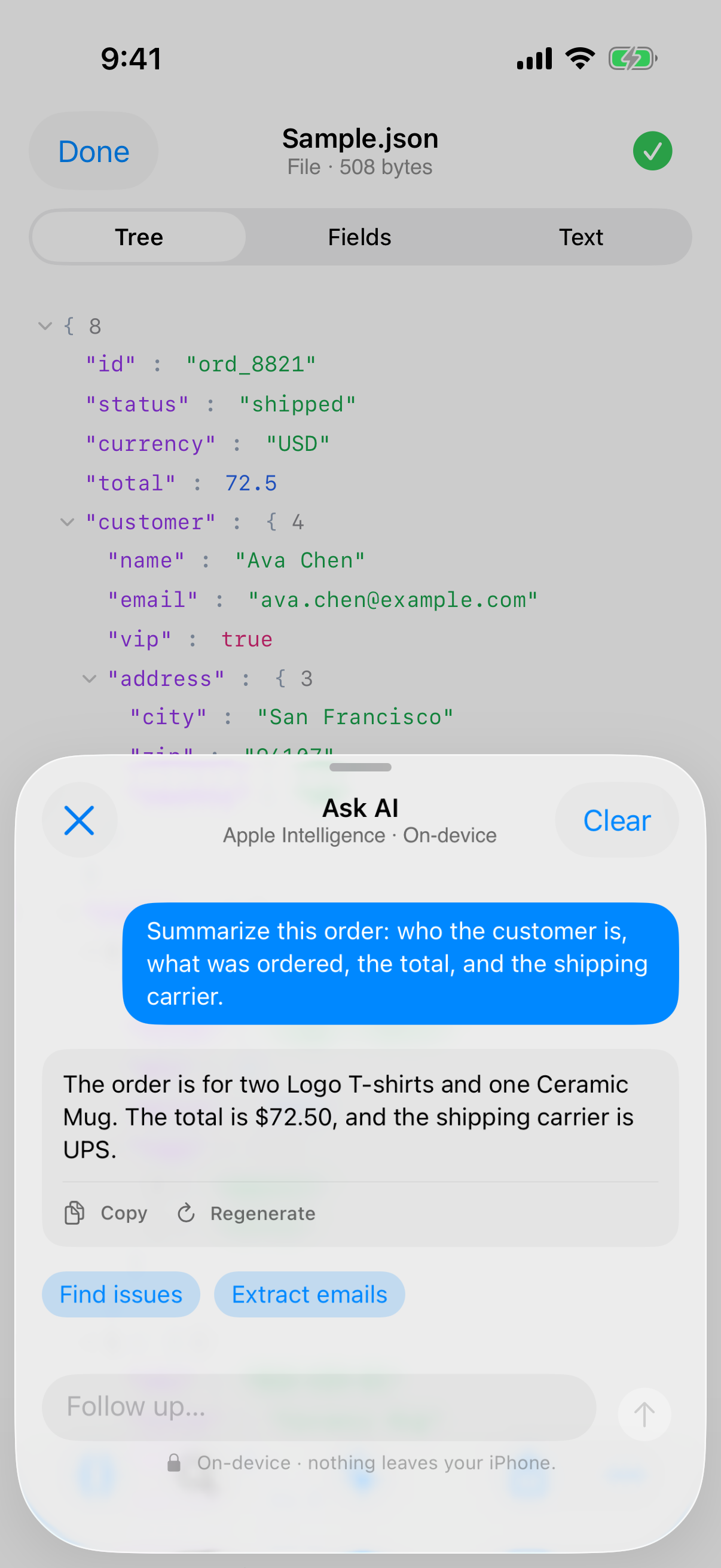
Ask "What is this?", "Find issues" or "Extract all emails" — Apple Foundation Models answers locally, in your language, with lists, bold text and code. Your JSON, your prompts and the model's replies never leave the device. No server, no API key, no cloud fallback.
Free where it matters.
View, validate, prettify, minify, search, edit, Save back to the original file, Share and export — all free, forever, with no account. Pro adds power tools, never the basics.
Open. Read. Ask.
Eight screens, one workspace.
Everything JSON Pilot: Viewer & Editor does, by area.
Everything about JSON Pilot: Viewer & Editor, on one page.
Guide, requirements, common questions, privacy, terms, and how to reach support.
How to use JSON Pilot: Viewer & Editor
Getting started
Open JSON Pilot and bring in a document any way that suits you: tap Paste from Clipboard on the Entry screen, tap Open File…, or use Open in JSON Pilot from Files, Mail, Safari, AirDrop or the share sheet. Files are decoded as UTF-8 first and Latin-1 as a fallback, so awkward encodings still open instead of erroring.
The three views
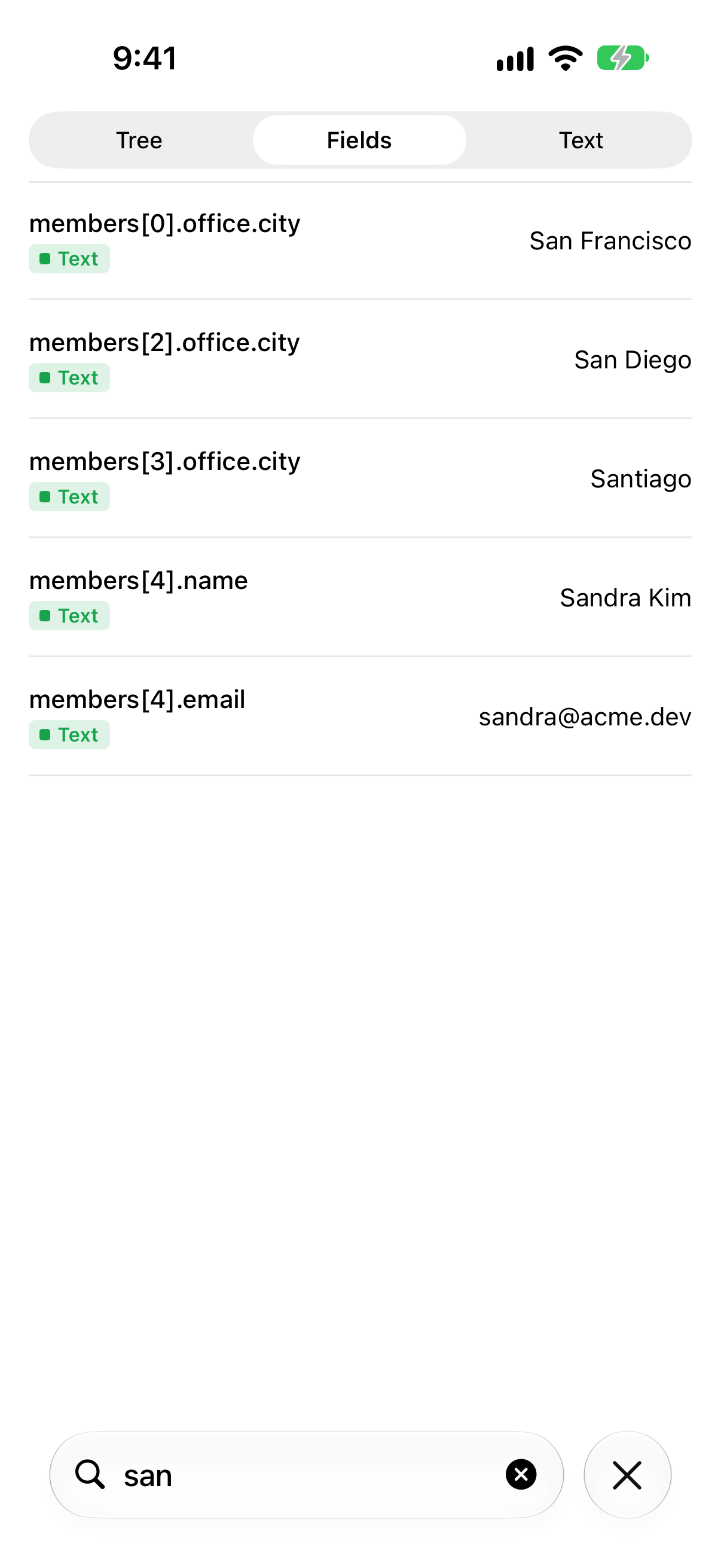
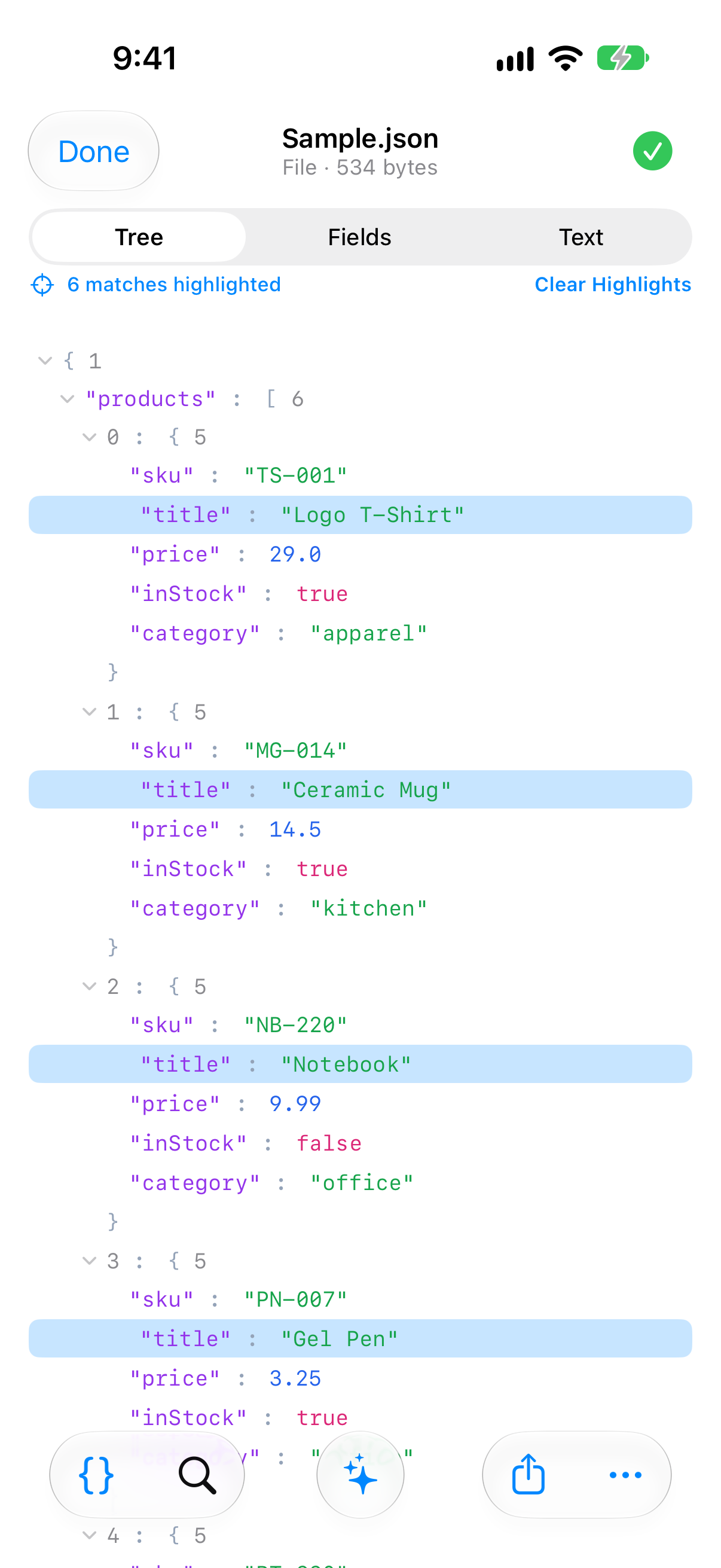
Every document opens into one workspace with three tabs: Tree for structure, Fields for tap-to-edit drilldown, and Text for raw source with line numbers. Edits sync across all three, and the check mark in the nav bar tells you instantly whether the document parses.
Editing and repair
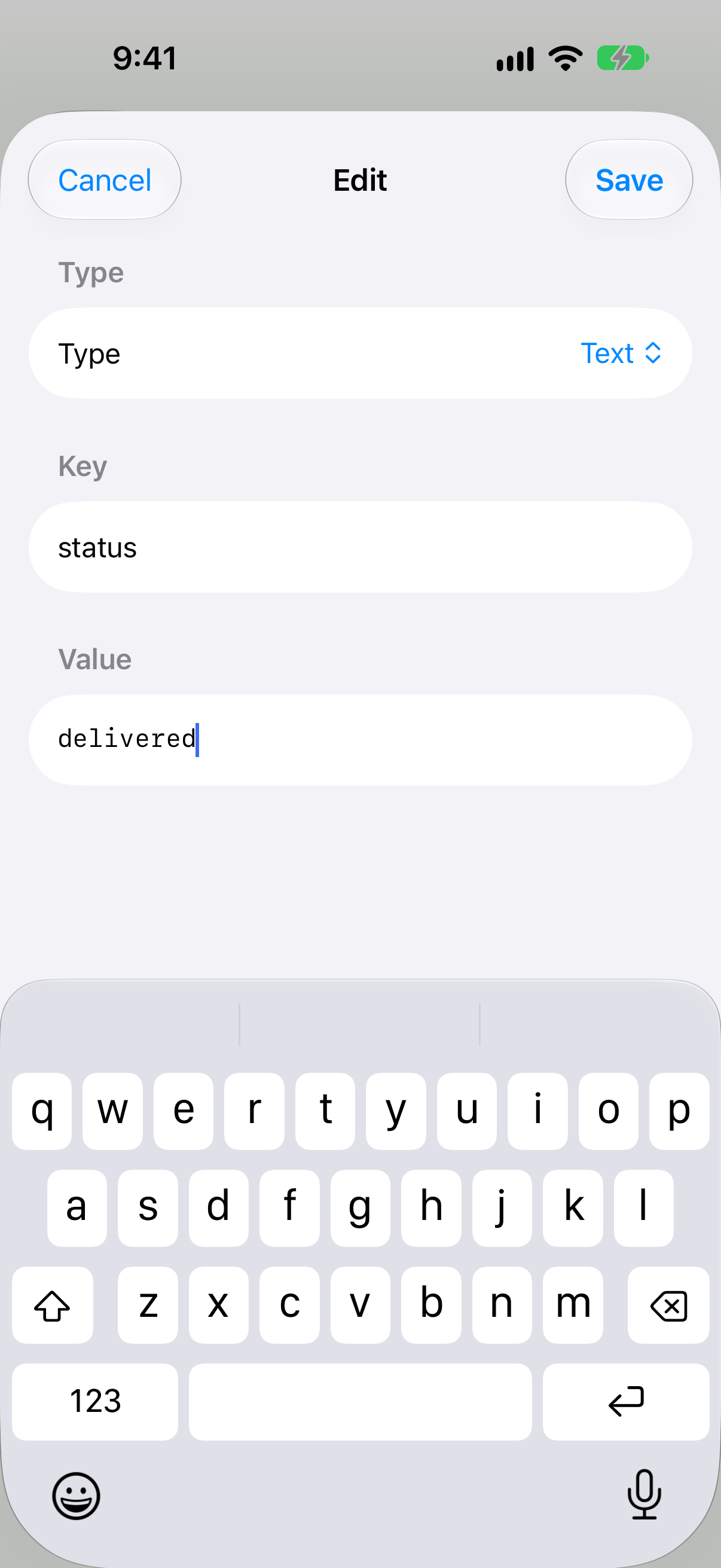
In Fields, tap any leaf to open the Edit Field sheet — change the value, the key, or the type (string ↔ number ↔ bool ↔ null), or delete it. Add a sibling with the inline “Add” row. Prefer raw text? Edit as Text drops you into a monospaced editor with a live Valid / line:col error banner; Apply commits the text back through the parser.
When input is invalid, Auto-fix (Pro) runs a deterministic relaxed-to-strict repair pass — trailing commas, // and /* */ comments, unquoted keys, single-quoted strings, and smart quotes — then re-parses. If the fix is only partial, the result opens in the editor with the residual error highlighted.
The on-device AI assistant
Open the AI chat on any document and pick a starter — Explain this JSON, Find issues, or Extract emails — or ask your own question. Replies stream as the model thinks, in your language, formatted with lists, bold text and code, and the conversation persists while the document is open.
The assistant is powered by Apple Foundation Models and runs entirely on your device. Your JSON, your prompts and the model's answers never leave the device — there are no AI servers, no API keys and no cloud fallback. It is gated by capability, not OS version: if Apple Intelligence isn't available, the chat tells you exactly why (device not eligible, Apple Intelligence turned off, or the model still preparing) and the rest of the app keeps working. Longer documents are truncated to a 6,000-character context budget, with a note so the model knows it's seeing a slice.
Power tools
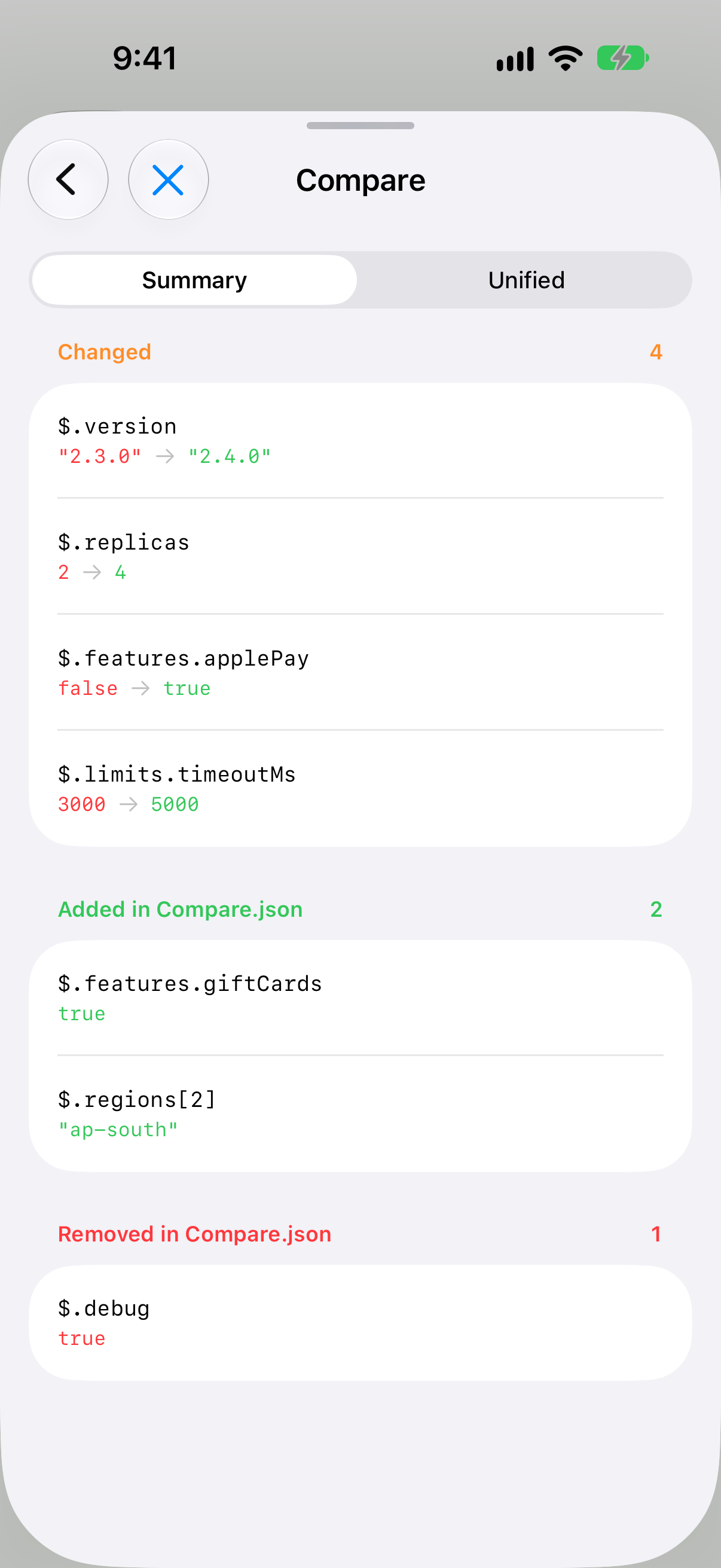
JSON Diff compares two documents by meaning — reformatting or key reordering never shows as a change — and lines up array items, and offers a Summary view (Changed / Added / Removed) and a GitHub-style Unified view. JSONPath supports $, .key, ['key'], [index], [*], recursive descent .. and negative indices, with matches highlighted right on the Tree.
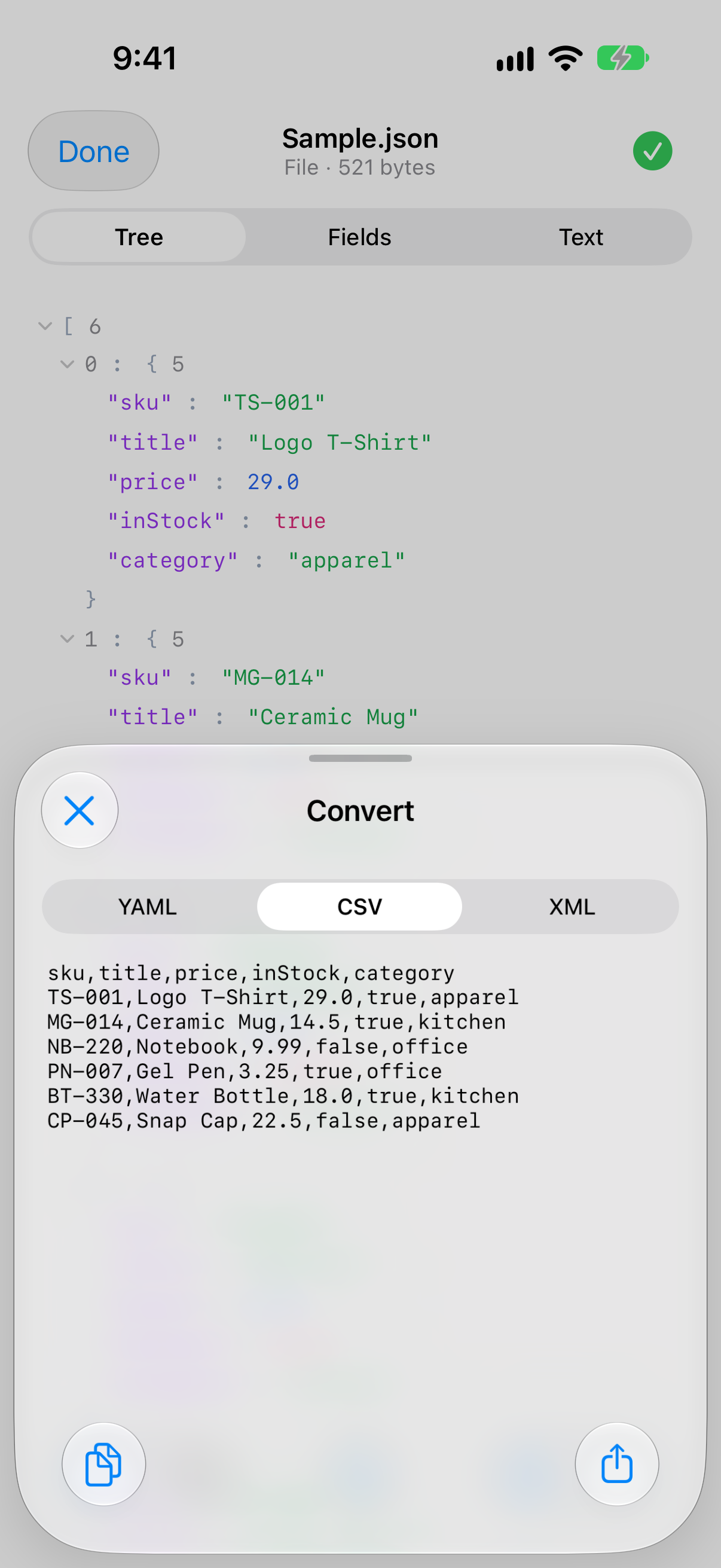
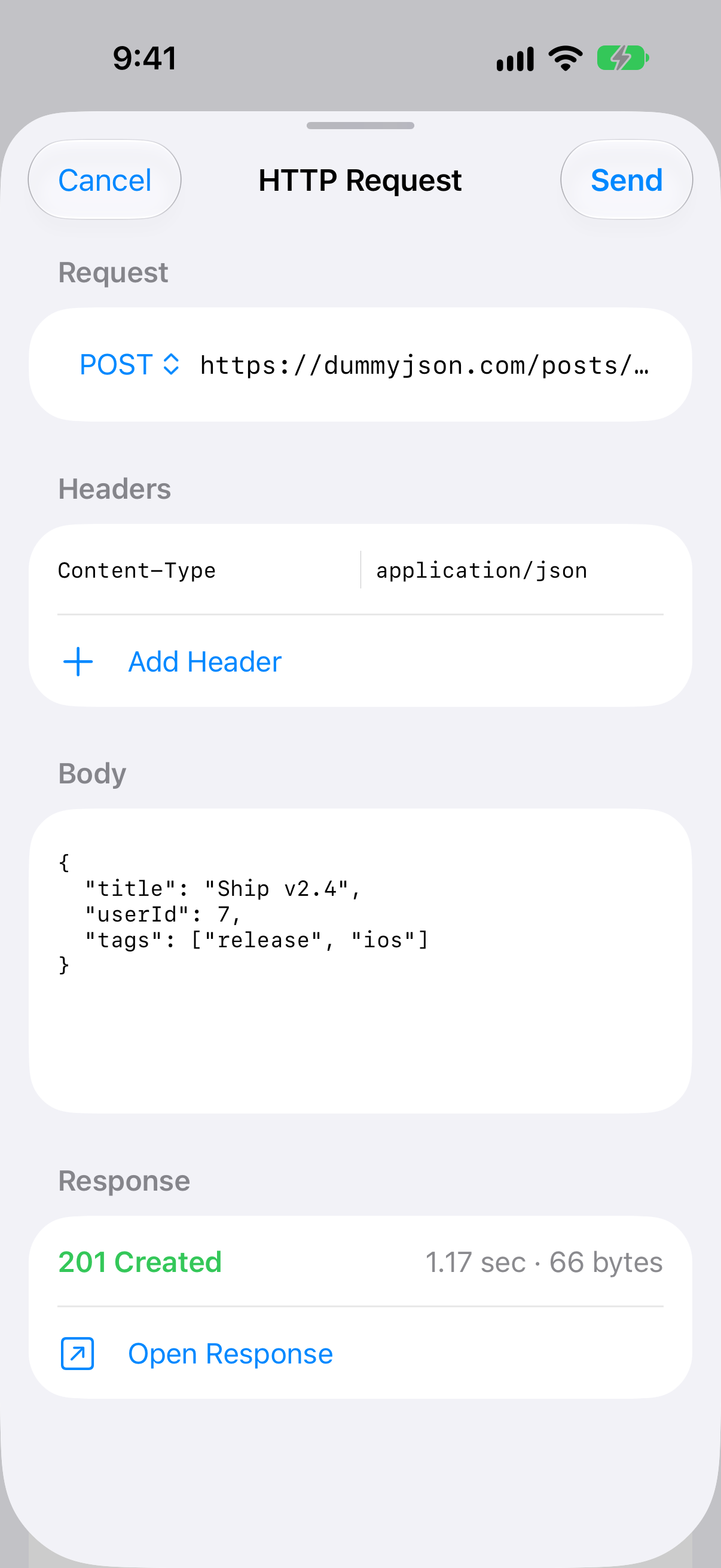
Format conversion exports the current document as YAML, CSV or XML. The built-in HTTP request tool sends GET / POST / PUT / PATCH / DELETE with custom headers and a body for non-GET methods, over http(s) only, with a 30-second timeout — and opens the response straight into the workspace. Responses are never cached on disk, and cookies are kept in memory only.
Privacy and storage
JSON Pilot opens network connections in exactly two situations, both initiated by you: StoreKit for purchases and entitlement refresh, and the HTTP request tool when you tap Send. Nothing else opens a socket — no analytics, no telemetry, no crash reporters, no third-party SDKs.
Recents are stored locally with SwiftData (CloudKit is explicitly off), capped at 60 entries. Your settings live in UserDefaults. To clear everything, use Settings → Data & Privacy → Clear Recents: it erases your history together with every local copy of your documents, including the copies made for sharing and the files other apps handed over. Or delete the app. The original files you opened are untouched unless you explicitly tap Save.
What you need
- iPhone or iPad with iOS or iPadOS 26.4 or later
- AI features require Apple Intelligence: iPhone 15 Pro or later, or an iPad with M1 or A17 Pro or later, in a language Apple Intelligence supports
- On other devices the AI assistant is turned off automatically; every other feature, including the other Pro tools, still works
- No network connection required for any feature except in-app purchase and the user-fired HTTP request tool
None. JSON Pilot requests no iOS permissions — not Camera, Photos, Contacts, Microphone, Location, or any other. The only system surfaces it touches are the file picker, the system pasteboard (on your tap), and the share sheet.
Common questions
Is any of my JSON ever sent to a server?
No. The only network traffic JSON Pilot initiates is (1) Apple's StoreKit for purchases and (2) HTTP requests you explicitly fire from the built-in request tool. JSON documents, edits, AI prompts and AI replies stay on your device.
How does the AI work without a server?
JSON Pilot's AI assistant uses Apple Foundation Models — the on-device LLM that ships as part of Apple Intelligence on supported iPhones. Inference runs locally, exactly like Apple's own Writing Tools.
Which devices can run the AI?
The AI features need Apple Intelligence: iPhone 15 Pro or later, or an iPad with M1 or A17 Pro or later, set to a language Apple Intelligence supports. On other devices the AI assistant is turned off automatically and the rest of the app — including every other Pro feature — works normally.
Do I lose access if I cancel the monthly subscription?
Pro features stop working when the current billing period ends. You can re-subscribe any time, or buy the lifetime unlock to keep Pro forever.
Why no free trial?
The whole viewer and editor is already free, with no time limit and no functionality cuts. The Pro tier is for the AI assistant and power tools — try those by buying the monthly subscription and cancelling if it isn't for you.
Does JSON Pilot need any permissions?
No. JSON Pilot does not request Camera, Photos, Contacts, Microphone, Location, or any other iOS permission. The only system surfaces it touches are the standard file picker, the system pasteboard (when you tap Paste or Copy), and the share sheet.
Does it sync across my devices?
No. JSON Pilot is local-only by design — CloudKit is explicitly disabled.
What's the maximum file size?
There is no hard cap. Documents above 50 KB enter “large-file mode”: big tree containers start collapsed, rendering is capped per node, and the text view skips syntax colour. Parsing, search and formatting run in the background, so multi-megabyte files open, search and edit without freezing.
Does the HTTP request tool support authentication?
You can add any custom headers (including Authorization), use any method (GET, POST, PUT, PATCH, DELETE), and include a request body for non-GET methods. The timeout is a fixed 30 seconds. http:// and https:// schemes are supported. Responses are never cached on disk, and cookies are kept in memory only.
Which languages does JSON Pilot speak?
English, German, Spanish, French, Italian, Brazilian Portuguese, Russian, Japanese, Korean and Simplified Chinese. The AI assistant answers in your language when Apple Intelligence supports it.
Why iOS 26.4 minimum?
Apple Intelligence APIs (the AI backbone) and the Liquid Glass design system both live in iOS 26. Targeting older iOS would either gut the AI or force a degraded UI.
JSON Pilot collects no data and ships no analytics, telemetry or crash reporters. The only network traffic is StoreKit and HTTP requests you fire yourself, and their responses are never cached on disk. The full policy covers what's stored, where, and for how long.
Read the privacy policy →A short, plain-English agreement covering personal use, purchases and subscriptions, and the warranty disclaimer.
Read the terms of use →Bug reports, feature ideas, refund requests — send a note via the form. Replies usually within a couple of days.
Open the form →

